
F-Button for HTC ChaCha1.09 - Get APK
You'll be able to download in few seconds.
Publisher Description
(The app is now free. Enjoy!)
This application lets you configure the blue F button of your HTC ChaCha. No root access required — simply install the application and choose what the button should do. It is possible to assign different actions for short-click and long-press events.
How to use:
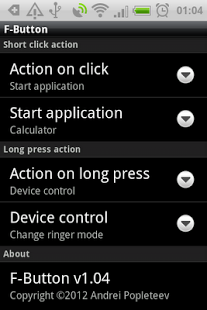
Once you install the application, click the blue F button. The phone will ask you whether it should launch "Custom F-Button action" or "Facebook for HTC Sense" (see screenshots). Check the "Use by default for this action" option, and then click "Custom F-Button action". Now you can choose what should be done when you click the Facebook button. Repeat the same for the long press, and you are done.
Configurable actions:
* Start application
* Device control
- Change ringer mode (normal/vibrate/silent)
- Toggle Bluetooth
- Toggle Wi-Fi
- Toggle mobile data
- Toggle flashlight
- Change screen brightness (min/normal/max)
- Expand status bar
- Show Home screen
* Social networks
- Post to Facebook
- Facebook Places checkin
- Post to Twitter (via Peep)
- Post to Twitter (via official app)
- Post to Google+
- Post to vKontakte (vk.com)
* Media player control
- Play/pause
- Go to next track
- Go to previous track
* Open web address (URL)
* Open F-Button config
Known issues:
- Most probably will not work on AT&T Status or HTC Salsa, please try the Lite version to check if the application works on your device.
- Requires firmware version 1.23 or higher (check yours in Settings - About phone - Software information - Software number).
- Some applications (such as Gallery, Camera and Opera Mini) override the Facebook key internally, so it might not be possible to detect short clicks of the Facebook button in these applications. However, long press should always be detected correctly.
Permissions:
- Create Bluetooth connections, Bluetooth administration: to turn Bluetooth on/off.
- Change Wi-Fi state: to turn Wi-Fi on/off.
- Camera (Take pictures and videos): to turn on the camera's LED flash (Flashlight function).
- View network state, Change network connectivity: to toggle mobile data.
- Modify global system settings: to change screen brightness.
Credits:
Polish localization - Krzysztof Lojowski
Keywords:
HTC Cha Cha, custom key mapping, FB remap, F-Button Full version, F-Button Pro, Facebook
About F-Button for HTC ChaCha
The company that develops F-Button for HTC ChaCha is Andrei Popleteev. The latest version released by its developer is 1.09.
To install F-Button for HTC ChaCha on your Android device, just click the green Continue To App button above to start the installation process. The app is listed on our website since 2013-06-02 and was downloaded 0 times. We have already checked if the download link is safe, however for your own protection we recommend that you scan the downloaded app with your antivirus. Your antivirus may detect the F-Button for HTC ChaCha as malware as malware if the download link to com.anmipo.android.fbutton is broken.
How to install F-Button for HTC ChaCha on your Android device:
- Click on the Continue To App button on our website. This will redirect you to Google Play.
- Once the F-Button for HTC ChaCha is shown in the Google Play listing of your Android device, you can start its download and installation. Tap on the Install button located below the search bar and to the right of the app icon.
- A pop-up window with the permissions required by F-Button for HTC ChaCha will be shown. Click on Accept to continue the process.
- F-Button for HTC ChaCha will be downloaded onto your device, displaying a progress. Once the download completes, the installation will start and you'll get a notification after the installation is finished.
Program Details
System requirements
Download information
Pricing
Version History
version 1.09
posted on 2013-06-02
Version 1.09,Changed app icon and name (due to polite request from Facebook).,Version 1.08,Added social networking functions.,Faster opening after long inactivity period.,Version 1.07,Added "Change screen brightness" function.,Version 1.06,Added "Toggle mobile data" function.,Version 1.05,No more flashlight blinking on orientation change.,Version 1.04,Added "Open URL" function.,Minor interface improvements.
version 1.09
posted on 2013-06-02
Several fixes and updates
Disclaimer
External Download
We do not host F-Button for HTC ChaCha on our servers. We did not scan it for viruses, adware, spyware or other type of malware. This app is hosted by Galad and passed their terms and conditions to be listed there. We recommend caution when installing it.
The APK Download link for F-Button for HTC ChaCha is provided to you by apps112.com without any warranties, representations or guarantees of any kind, so access it at your own risk.
If you have questions regarding this particular app contact the publisher directly. For questions about the functionalities of apps112.com contact us.
